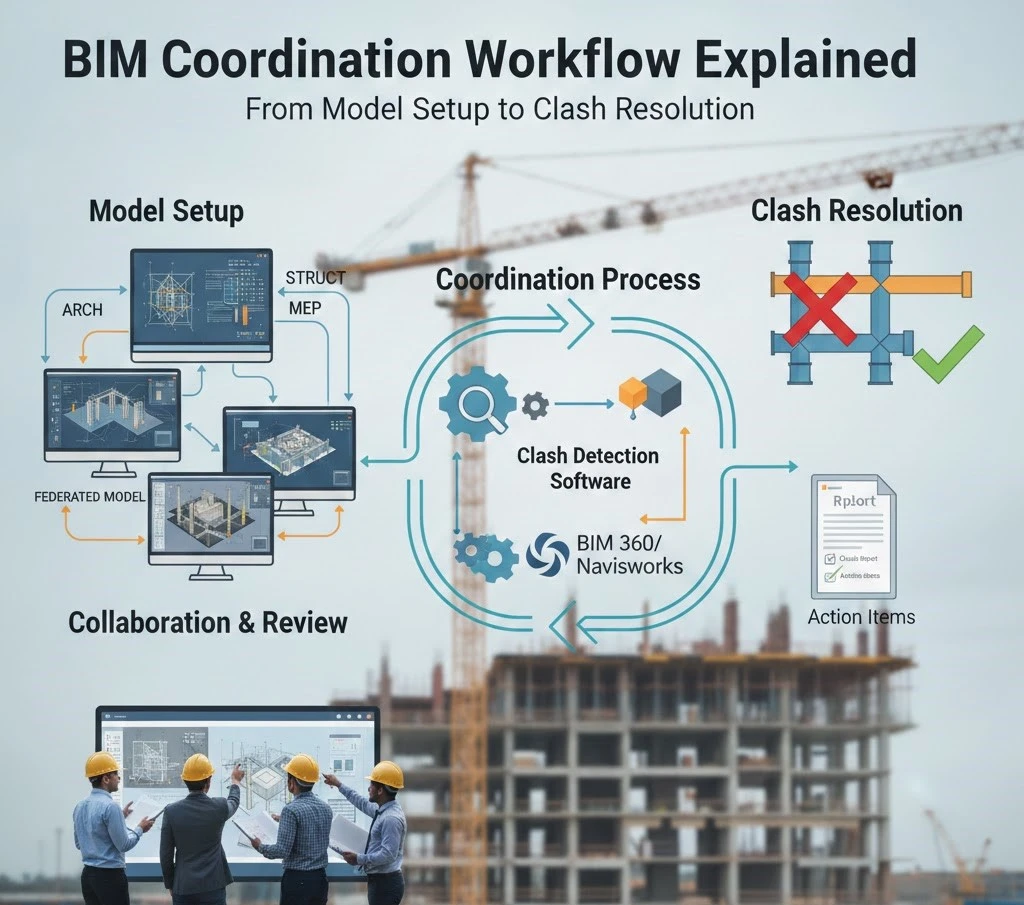
BIM workflow involves all the steps that detect the clashes and present customized solutions for seamless execution. This workflow is performed by a number of team members. The BIM coordinator role is very crucial to connect all the stakeholders and keep them aligned on the same design. As an engineer, contractor, or architect, you should have an in-depth understanding of what BIM coordination is and how it works to control costs and errors. If you stick with us until the end, you might get an idea of what kind of BIM coordination services are best for your project. So, let’s start.
What is BIM Coordination Workflow?
In the rapidly growing construction industry, manual and 2D methods are not enough for smooth construction. You need to adopt BIM workflow to improve installation, reduce errors, and increase project efficiency. In fact, BIM coordination is the process of bringing together project models, such as structural, MEP, and architectural data, on a single file to identify their problems and make them more accurate.
BIM is essential to avoid order changes and rework. In addition, when all potential risks are resolved, it enhances the project concept and eliminates the possibility of rework and delays. It also increases project efficiency and maintains quality.
What Is BIM Coordination?
BIM coordination brings together all the different discipline models, like structural, architectural, and MEP, on a data-rich federated model coordination page to detect and resolve potential risks. To make the models more accurate and of high quality, engineers also use software that helps to remove even the smallest errors. This process also ensures that every column, wire, pipe, and internal part will work without disturbing the other systems.
Key Concepts And Terminology
What you get in BIM coordination to plan a project strategically and without any errors, from concept to implementation include all information. To understand the BIM plan, you must understand the terms and terminologies. You must know the terms of soft clashes and hard clashes. Besides, there are also some other important terms. Let’s explain them all one by one
Hard Clashes: These types of clashes occur due to the integration of components of one discipline with others, which can cause costly rework and delays.
Soft Clashes: If any components are in the buffer zone which can cause problems in repairing and maintaining them later due to limited space. This can also increase the cost.
- After BIM coordination, the models are converted into federates that present the project visualization error-free.
- Common Data Environment (CDE): The BIM coordination team prefers to use common tools to send the final model to all stakeholders. This allows them to access the latest designs and avoid confusion.
- BIM Execution Plan (BEP): This plan helps all engineers install the components with the right method in structures, walls, and rooms. This prevents material waste.
- Issue Tracking (BCF): With BCF, you can easily track issues related to communication, installation, and procurement for smooth execution and avoid conflicts.
Roles In BIM Coordination
The BIM modeler creates the model according to the client’s demands and the required LOD. Coordinators and managers are responsible for detecting all conflicts and making the model highly accurate. They also meet the guidelines and local codes to maintain project standards and building quality.
When coordination is done in models, we deliver them to stakeholders such as architects, engineers, and contractors to support error-free construction. We also deliver clash reports, update their designs, and make adjustments to new changes in design.
BIM Coordination Workflow Steps
The BIM coordination workflow is organized before construction begins, so engineers and contractors can avoid conflicts and risks from day one. It also enables them to stay on schedule and on budget.
Let’s explore each phase of the coordination step by step.
BIM Execution Plan (BEP) & Team Setup
To avoid unsatisfactory results, BIM engineers should be informed of their responsibility in the design, content, and goals of the project. To do this, the BIM coordinator role is crucial, who creates a document that includes all the data needed for the coordination process, including meeting scheduling, software requirements, and strategy. Additionally, site requirements, municipal codes, and customer expectations are also mentioned to deliver the client’s desired results. This makes the coordination process easy and transparent.
Discipline Model Creation
After understanding the client project requirements, each structural and MEP engineer starts building their models with cutting-edge technology. Before sending them to the coordination team, they must ensure that every beam, slab, wire, pipe, and room size is in accordance with the client’s preferences and local codes. This is critical for successful integration.
Model Federation
When structural, MEP, and architectural models are created, coordinators combine them on a data-rich platform to check their quality. This phase provides a visual representation of the project and shows how each element of the building will work without conflicts. It also allows clients to change or add any requirements to the design before they start.
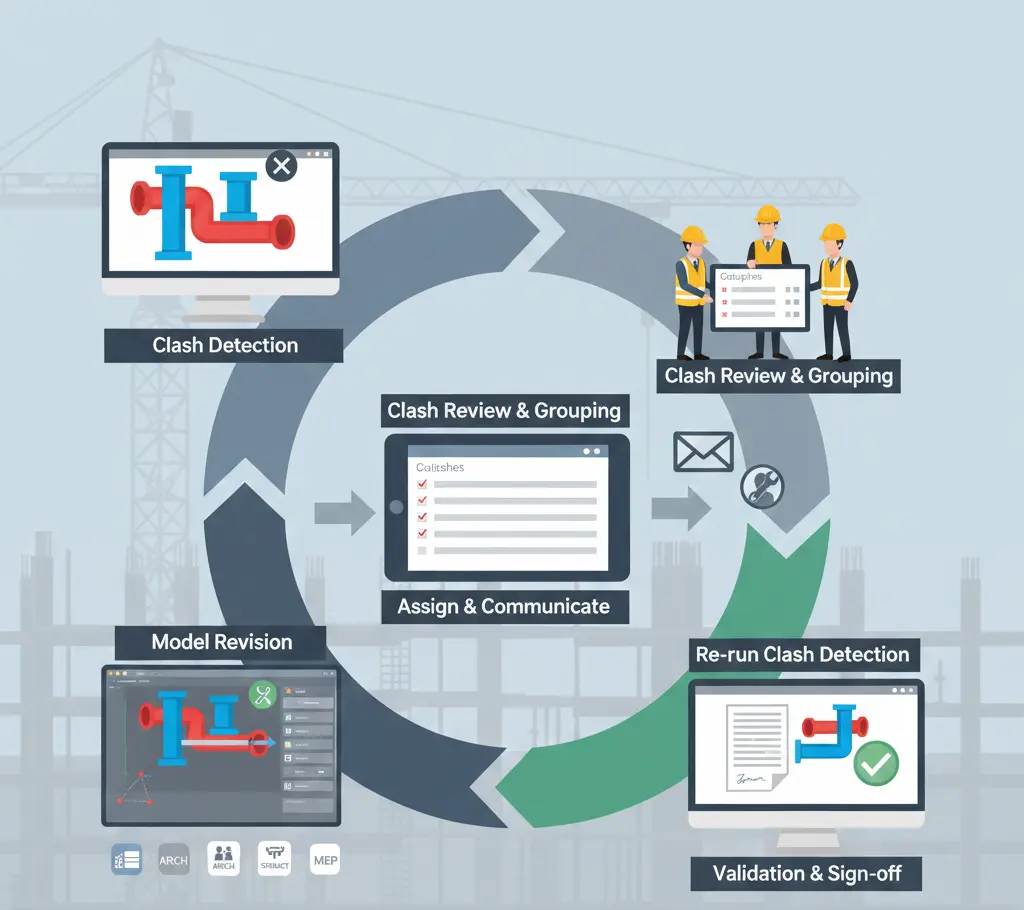
Clash Detection
Then, the team of BIM clash detection detects the potential issues with the latest technology. Error can be in the beam placement, MEP integration, or inaccurate room sizes. Clashes are detected at this stage and rework, delays, and poor decisions can be avoided when all detection is completed on schedule. Further, it also enhances resource allocation, teamwork, and project planning to help you stay on course
Issue Resolution And Automation
When issues are detected, each discipline team is notified of the conflicts in their models and is responsible for providing the best solutions to address them. On the other hand, the automation process keeps checking the models to ensure accuracy, especially after any changes.
Documentation And Hand-off
At the final stage, once conflicts are resolved, we review the models to check their quality and ensure they meet site, project, and regulatory requirements. We then send the final buildable models to the project engineers and contractors for use in construction.
The following table explains the comparison of a project when performed with traditional drawings and with BIM modeling.
| Metric | Traditional Process | With BIM Coordination |
| Project Duration (days) | 107.4 | 89.0 (≈17% faster) |
| Number of Drawing Revisions | 21.2 | 4.2 (≈80% reduction) |
| Budget Deviation (cost overrun) | 6–10% | ~0% (virtually eliminated) |
Tools & Technologies For BIM Coordination
Using BIM software tools is not an option; it is essential for seamless collaboration, smooth installation, and clash detection. It also helps to meet project needs and timelines. Below are the types of software used in coordination.
Common Data Environments (CDE)
CDE distributes data, including models, PDFs, and drawings, to ensure that all members of the construction team receive the same design. Additionally, if any changes occur due to new clients and regulatory requirements, it quickly makes adjustments and notifies the team so they can work next according to the latest design and prevent rework.
Navisworks Manage
To detect material quantities and clashes early, you can adopt NaviWork. It is a comprehensive tool that identifies clashes in structural, architectural, and MEP models on a unified file and enhances the model clash resolution workflow. It guides to improve the order material in the right quantity, such as beams, lumber, wires, pipes, and sand. It also handles large-scale complex projects with ease to improve risk management, decision-making, and design quality.
Solibri Office
If the construction team wants to solve problems without sacrificing quality, they can rely on the Silbery Office tool. It checks and reviews models for code compliance, clash detection, and design coordination. It manages everything while maintaining project quality. With this tool, you can control costs, save time, and eliminate rework.
Other Collaboration Tools
There are some other collaboration tools which are commonly used for BIM modeling. A few of them are given below.
| Tool / Platform | Role in Coordination | Key Features |
| Autodesk BIM 360 (ACC) | Cloud CDE + Clash Management | Auto clash detection, model aggregation, issue tracking |
| Navisworks Manage (Autodesk) | Desktop model federation & clash checking | Supports many formats, manual & rule-based clash tests |
| Solibri Office | Rule-based model checking & validation | Advanced rule sets, IFC support, automated reports |
| Autodesk Revit | Model authoring/linking | Discipline model creation, live Revit-to-Revit linking |
| Revizto / BIMcollab | Real-time coordination platform | Centralized issue markup, 3D viewer, cloud sync |
Benefits and Outcomes of BIM Coordination
Construction projects that begin with BIM workflow reduce several problems, including rework, errors, design changes, misunderstandings, and budget overruns. The result is components installed in the right places, resource allocation is wise, collaboration in BIM projects is strong, and the right amount of materials is ordered. It also helps to delight the client with the delivery of their expected results. Although CAD drawings are also used for seamless execution on the site, BIM modeling is more advanced and brings more accuracy.Some core benefits of using BIM coordination in detail are given below. However, if you are confused and want to decide CAD or BIM , which workflow will be beneficial for your project scope, then read our blog CAD vs BIM in detail.
Reduced Errors And Rework
The primary benefit you get from BIM coordination workflow is the reduction of errors that result in rework. Sometimes, rework is caused by design changes, inadequate teamwork, design conflicts, and new regulatory requirements. To avoid this, it is important to detect and resolve conflicts in pre-construction planning. This helps to present a more accurate picture of the project that guides engineers through the installation with the right approach.
Improved Schedule And Cost Control
Controlling costs and staying on schedule are key elements of compliance and meeting timelines. This is possible with BIM coordination because it provides you with accurate 4D and 5D models that provide material cost takeoff and installation sequence. This helps us stay on track and on budget until the end. It also improves profitability and project quality.
Boost Seamless Teamwork
Strong communication requires every member to have the same design and understand the project’s requirements. For this, BIM workflow encourage to use shared platform to send documents to contractors, engineers, and fabricators. This removes rework, delays, and budget overruns that happen due to confusion and not updated with the latest design. It also enables the team to stay informed about changing requirements on a single platform.
Best Practices in BIM Coordination
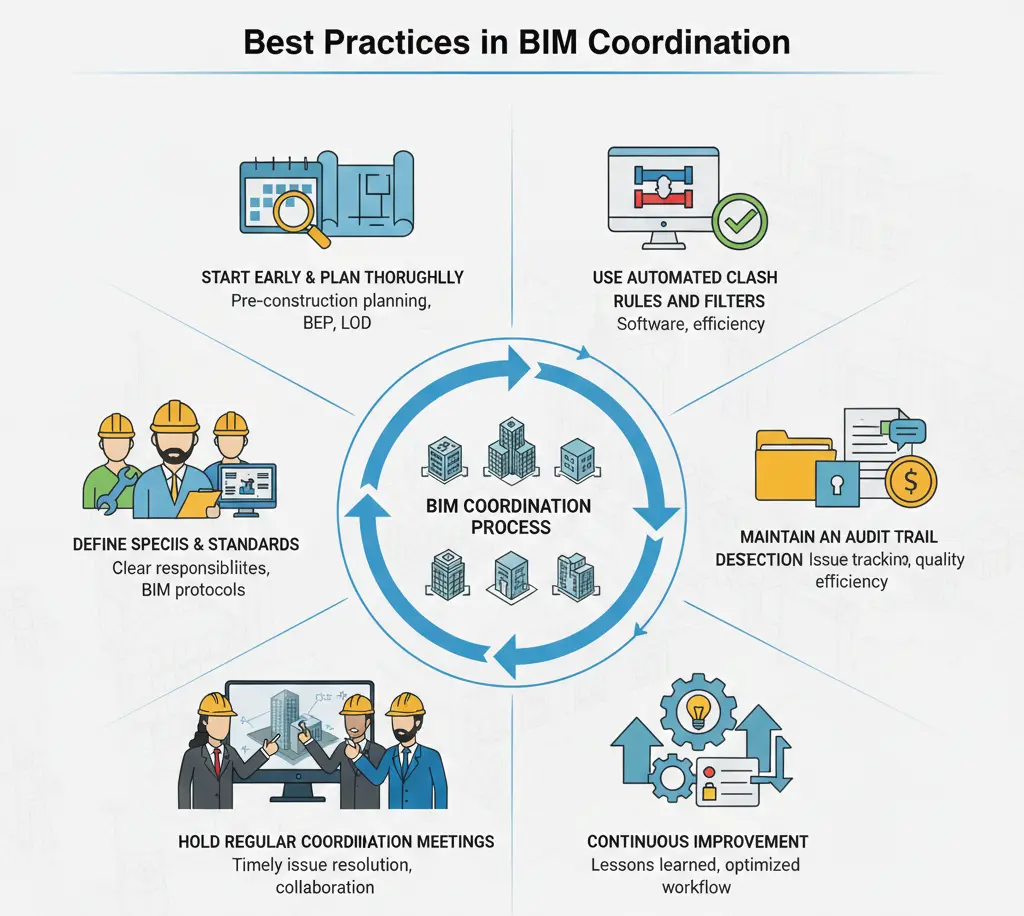
Best practices in BIM coordination are important for process, interoperability, and regular conflict detection. It also focuses on the timely resolution of issues and conflicts to streamline construction.
Start Early And Plan Thoroughly
The construction team should prefer to include BIM coordination in the pre-construction planning phase to start flawless construction from day one. To plan the project with an accurate design, it identifies and corrects errors in each model. BEP is also important in the planning phase, as it reflects the project requirements, standards, and LOD.
Define Specific Roles & Standards
If every member understands the project requirements, confusion and miscommunication are automatically eliminated. For this, BIM modelers, managers, and coordinators need to know BIM strategies and standards for modeling, conflict detection, and meeting regulatory compliance before starting. That’s why it should ensure every role is defined properly.
Hold Regular Coordination Meetings
Regular BIM coordination review meetings help protect the project from unexpected costs and delays. Because members quickly identify and resolve any design, procurement, or installation issues during the meeting to ensure that the process continues as planned. It also increases project efficiency without sacrificing quality.
Use Automated Clash Rules And Filters
Nowadays, BIM coordination is being enhanced by the use of automatic clash detection software. It automatically checks the construction process; if there is any error in the structural or MEP system, it notifies the team and enables them to resolve it. It also saves time and money.
Maintain An Audit Trail
This is one of the key steps that establishes clear policies, access controls, and secure storage for project risk management and accountability. The trail also checks the quality of new decisions, design changes, and schedules, and detects existing potential errors to ensure model quality assurance in BIM. During this process, coordinators have to create a report that explains who, when, and how Issue tracking in BIM was resolved.
Continuous Improvement
The project keeps becoming better every day when everyone adheres to new designs, installation techniques, and code compliance. This helps increase collaboration, efficiency, and functionality. Also, lessons learned reduce errors, improve training, and streamline workflow. If you want to construct smoothly without hassle, BIM coordination should be adopted.
BIM Modeling Offers Comprehensive BIM Coordination Services for Efficient Execution
At BIM Modeling, we offer top-tier coordination services with skilled professionals. We are the first choice of contractors because we provide conflict-free models for planning and installation materials while maintaining quality and meeting essential requirements.
At our company, every team member has over 5 years of experience in BIM coordination. Whether it’s a home renovation project or a restaurant construction project, we are experts at eliminating all potential risk factors and conflicts from models before breaking ground or starting planning. We also bring clarity to models with industry-leading software that improves decision-making and scheduling. Our BIM charges are affordable. To know the cost of BIM modeling in detail, you can read our blog.
To help you install structural, building, and MEP components in the right place without system clashes, we perform an in-depth analysis of your models according to your project’s requirements. We do all this with advanced tools to detect errors and resolve strategically to minimize rework, delays, and additional costs. Our team also reduces design conflicts by 80% with BIM coordination. All of these benefits deliver excellent results by improving ROI, project efficiency, and system functionality.
If you want to avoid construction losses due to poor collaboration and design flaws, you should consider taking advantage of our BIM coordination services. We not only meet your challenges but also ensure regulatory compliance.
| Contact Us |
FAQs
What is the BIM coordination workflow?
In the BIM coordination workflow, modelers create models for structures, architecture, and MEP, and coordinators integrate the models to detect clashes and make them buildable and correct. This is done for error-free construction and a complete project within budget and timeline.
How does clash detection in BIM work?
Coordination specialists use software to detect hard and soft clashes from models, enabling the team to strategically resolve them quickly.
What is a federated BIM model?
Federated models are not merged into a unified file; they are linked together on a single page. This allows for comprehensive synchronization and easy control of the ownership of each model.
When should BIM coordination start?
The pre-construction process should include BIM coordination, so you can start planning for budgeting and scheduling with accurate design and strong collaboration.
How do federated models improve coordination?
This is to detect clashes, clarify designs, and improve coordination by sending a single design to all stakeholders. When all members are up to date with the latest designs, they can plan the project together with better judgment.
Which software is best for BIM coordination?
Coordinators adapt software according to the size of the project, requirements, and site requirements. But Autodesk Navisworks, Solibri, and Revit are high-end software that help in making models error-free and improve project efficiency.
