

BIM modeling looks simple on paper, but the cost of it can swing wildly if you don’t understand what you’re actually paying for. A small shift in scope, an extra layer of detail, or a sudden request for coordination can push the budget in directions nobody planned for. When the estimate is wrong, the project stumbles. When it’s close to real conditions, teams avoid a lot of unnecessary headaches.
Prices vary a lot. Some projects fall near $0.50 to $3.00 per sq ft for straightforward modeling. Others can reach $3.00 to $10.00+ per sq ft. For scan-based or MEP-heavy work, hourly rates often land around $39 per hour.
This guide explains why those numbers move. We will also streamline how to read them and what to expect in 2026.
How BIM Services Are Priced
BIM pricing doesn’t follow one strict rule. Different firms use different methods, and each method fits a different type of project.
Hourly / Daily Rates
Some companies price BIM work the same way they price drafting or coordination support, by the hour or by the day. It’s direct and easy to understand. However, it can feel unpredictable when the scope isn’t stable. Hourly billing works best when the project is small. Many consultants fall around mid-range market rates, and the hours rise or fall based on complexity.
Why it’s used:
- For unclear or evolving scopes
- Quick fixes, minor updates, small modeling jobs
- When clients want close control of the workload
Pros: flexible, simple to start.
Cons: hard to forecast if the design keeps moving.
Per-Square-Foot / Per-Square-Meter Pricing
This method shows up most often in Scan-to-BIM or full building modeling. The modeler looks at the size of the building and sets a rate per area. Larger buildings don’t always mean higher difficulty, so this method sometimes gives owners a predictable early estimate. It works well for straightforward architectural geometry or simple MEP layouts.
Why it’s used:
- Quick budgeting on medium or large sites
- Clean building shapes
- Projects where model depth is known early
Pros: easy comparisons between vendors, good for planning.
Cons: unusual shapes, dense MEP, or heritage structures can break the pattern and raise costs.
Per-Element / Per-System Pricing
Instead of charging by area or time, some BIM firms charge by the number of components. That might mean pricing per MEP system, per Revit family, or per equipment category. This model fits projects where certain elements require special attention, like custom mechanical rooms or equipment-heavy industrial floors.
Why it’s used:
- When detail varies across systems
- Complex MEP zones
- Projects with many unique components
Pros: accurate for uneven workloads.
Cons: requires a detailed list before pricing even begins.
Fixed-Price or Milestone-Based Fees
Fixed pricing is common when the scope is clear and the deliverables won’t change much. The vendor sets a flat amount and breaks it into stages like concept, modeling, coordination, handover. Owners often like this because it removes surprise charges, but it only works when both sides agree on the exact output.
Why it’s used:
- Stable drawings
- Defined LOD
- Clear timelines
Pros: predictable cost, easier approvals.
Cons: any change in scope becomes a separate negotiation.
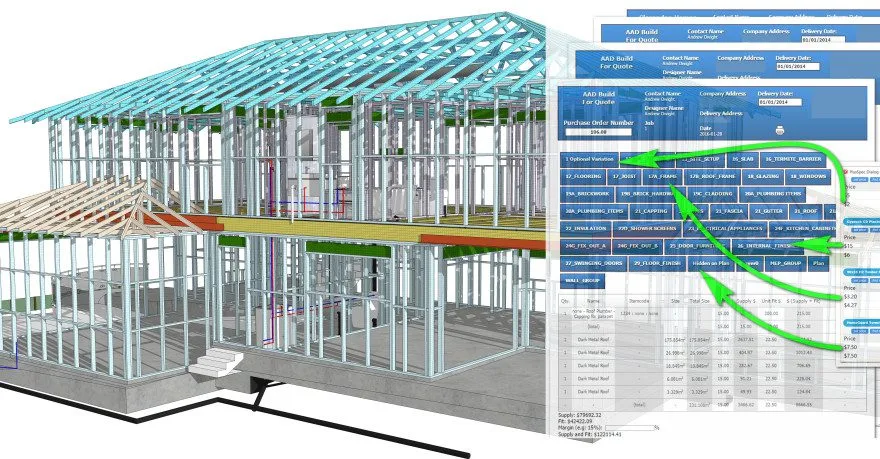
Market Rate Benchmarks
BIM pricing doesn’t land in the same place everywhere. It shifts with labor markets, project habits, and even how fast a firm works. The numbers below won’t match every project. However, they give a grounded sense of what people actually see when collecting quotes.
In the United States and Canada, hourly rates for everyday modeling work usually sit somewhere in the upper-30s to low-40s per hour. Some firms charge more for fabrication-level detail. When priced by building size, straightforward modeling often falls around $0.50 to $3.00 per sq ft. Scan-to-BIM, tricky MEP zones, or high LOD models climb toward $3.00 to $10.00+ per sq ft. The jump usually comes from point-cloud cleanup or heavy coordination.
Across Europe, the range spreads out again. Western Europe tends to sit higher than Central or Eastern Europe. A lot of Scan-to-BIM work ends up between €5 and €50+ per m². Old buildings, heritage features, or cluttered mechanical rooms push the number up. Clean, modern layouts fall on the lower end. Moreover, there are several parts of Asia and Europe where BIM rates are not soaring. South Asia, Southeast Asia, Eastern Europe, and parts of Latin America are some of them.
Below is a simple table you can place directly into the blog:
| Region | Typical Hourly Range | Per-Sq-Ft / Per-Sq-Meter Range | Notes |
| US / Canada | $35–$45/hr | $0.50–$3.00 (basic), $3.00–$10.00+ (scan/MEP) | LOD drives cost quickly |
| Western Europe | €35–€55/hr | €5–€50+ per m² | Heritage sites skew high |
| Eastern Europe | €20–€35/hr | Lower end of EU ranges | Often used for hybrid teams |
| South & SE Asia | $15–$30/hr | Varies widely | Common for high-volume tasks |
| Latin America | $20–$35/hr | Moderate | Useful for nearshore workflows |
Key Factors That Drive BIM Pricing
BIM cost doesn’t come from a single source. It’s a mix. Some factors push the number up fast, others barely make a dent. Understanding them helps avoid surprises.
Level of Development (LOD / Level of Detail)
LOD is the most obvious cost driver. A model at LOD 100 is very basic with just massing, simple walls, maybe floor slabs. It’s quick, cheap. LOD 200–300 adds dimensions, internal partitions, and basic systems. Costs can double compared to LOD 100. LOD 400–500 is fabrication-ready. Every pipe, duct, or beam must be accurate. Some scan-to-BIM projects at LOD 500 can cost three to five times more.
Project Type & Complexity
Simple houses are one thing. Hospitals, industrial plants, or mechanical-heavy buildings are another. More systems, tighter tolerances, and overlapping services mean more hours. Dense MEP layouts, intricate geometry, or multi-story coordination tasks raise labor hours significantly. One extra floor or a single mechanical mezzanine can easily add 10–20% to the estimate.
Point Cloud & Scan Processing
Scan-to-BIM work isn’t free. Raw point clouds arrive messy. Noise must be removed, alignment corrected, and surfaces cleaned. Each scan takes hours to process before modeling starts. A 2,000 m² building scanned and modeled can take 30–40% more hours.
Deliverables & Use-Case
Not every model is the same. Visualization models focus on looks. Coordination models check clashes. Fabrication-ready models must include exact sizes, manufacturer details, and installation requirements. Fabrication models cost the most because every element must match reality precisely. Skipping this step saves money, but risks downstream problems.
Learn The True Cost Of BIM Modeling From Our Experts
Contact UsSoftware & Licensing Needs
BIM software isn’t free. Revit families, MEP fabrication parts, and specialty plugins can be expensive. Some vendors charge for licenses or include a markup in the final cost. Proprietary formats or extra software conversions add extra labor.
Turnaround & Revisions
Short deadlines are expensive. Rushed projects or frequent changes force teams to work overtime. Even minor RFI-driven changes can add hours. If a model requires multiple revisions for approval, the cost climbs.
Coordination & QA
Coordination isn’t optional in complex projects. Clash detection, federated models, QA reviews, these steps are essential but time-consuming. They add accuracy, but also labor. Skipping QA reduces cost but increases risk of errors later.
Data Handover & Asset Management (BIM for FM)
Adding asset information or COBie data for facility management isn’t trivial. Every element needs properties, metadata, and documentation. The more data, the more time. Even a small hospital floor can take 15–20% more hours if FM-level details are required.
In short, BIM pricing is a puzzle. LOD, complexity, scans, deliverables, software, deadlines, QA, and FM data all combine. Skip one, and costs may drop. Include everything, and the estimate rises. Understanding each factor early avoids sticker shock and gives better control over the final number.
Step-by-Step Method to Estimate a BIM Modeling Cost
Estimating BIM costs isn’t exact. It is messy. Every project is different. You need to look at it piece by piece. Each step reduces guesswork.
Step 1: Define Scope and LOD Requirements
First, figure out what the model is for. Some projects need only basic shapes. Others need every pipe, duct, or beam. Ask what the client wants. Coordination? Clash detection? Facility management? Visualization?
Then, translate that into LOD. LOD 100 is very basic. LOD 200–250 adds walls, partitions, and systems. LOD 350–400 includes more detail for coordination. LOD 500 is fabrication-level. Write down what needs to be delivered for each LOD. Don’t skip this. If you misunderstand, hours (and money) will increase later.
Step 2: Break the Project Into Units
Next, divide the project into measurable units.
- Square footage works for simple buildings.
- Floors are useful if each level is similar.
- MEP zones help when there’s a lot of mechanical or electrical work.
- Revit families or components matter if billing per element.
Pick the unit that matches your project and the way the vendor works. This gives a baseline for estimating hours and costs.

Step 3: Use Productivity Rates
Now you need to know how fast a modeler works.
- Architectural geometry: 200–350 sq ft per hour (LOD 200–250).
- MEP ductwork: 5–10 meters per hour.
- Plumbing or electrical: 3–7 meters per hour depending on complexity.
Use these as a guide. They vary by team, experience, and software setup. Test on a small pilot area if possible. That will tell you if your assumptions are realistic.
Step 4: Estimate Hours × Rate
Multiply hours by the hourly rate. If you use per-square-foot pricing, multiply area by rate instead. Don’t forget:
- Project management hours
- Software or licensing costs
- QA or coordination
- Contingency (8–15%)
Formula:
Total cost = (Modeling hours × Hourly rate) + (PM hours × PM rate) + Software + QA + Contingency
It’s a starting point. It’s not exact. Revisions and changes can shift numbers.
Worked Examples
Example A: Small Residential Renovation (2,500 sq ft, LOD 250)
- Simple architectural + structure
- 250 sq ft/hour → 10 hours
- Rate $40/hour → $400
- PM 1 hour → $40
- QA + software → $50
- Contingency 10% → $49
- Total ≈ $539
Example B: Medium Commercial Office (30,000 sq ft, LOD 350, MEP)
- Architecture + structure + MEP
- Architectural: 30,000 ÷ 300 = 100 hours
- MEP: 1,200 meters ÷ 8 = 150 hours
- Rate $45/hour
- PM: 15 hours → $675
- QA + software: $1,200
- Contingency 12% → $1,674
- Total ≈ $11,874
Example C: Scan-to-BIM Heritage Building (2,000 m², LOD 350–400)
- Full architecture, structure, MEP, point-cloud cleanup
- Scan processing: 20 hours
- Modeling: 2,000 ÷ 50 = 40 hours
- Rate $50/hour
- PM: 8 hours → $400
- QA + software: $800
- Contingency 15% → $1,110
- Total ≈ $4,310
FAQs
Does Scan-to-BIM always cost more?
Usually, yes! But not always. The scanning process, point cloud cleanup, and extra modeling hours add labor. If the building is simple or mostly empty, the difference can be smaller. Complexity drives the price more than the scan itself.
What affects LOD costs the most?
LOD determines detail level. More detailed models require every system, pipe, or structural element to be exact. The higher the LOD, the more hours needed. Coordination, fabrication readiness, and metadata also increase costs significantly.
How do I compare BIM quotes fairly?
Check scope first, not just price. Make sure LOD, systems, and deliverables match. Compare what’s included, like PM hours, QA, software, revisions. Different vendors may label LOD the same but include different elements.
When do vendors use per-square-foot pricing?
Per-square-foot pricing works best for large, uniform buildings. Simple architectural or structural models fit this method. Complicated MEP-heavy projects or highly irregular structures usually require per-element or hourly pricing instead.
How accurate are BIM cost estimates?
Estimates are only as accurate as the data and assumptions used. Missing scope, unknown MEP complexity, or unclear LOD can skew numbers. Pilot zones or sample modeling usually improve accuracy before committing to full estimates.
What data should clients provide to reduce cost?
Clear base drawings, accurate floor plans, and site measurements help. Photos or scans of existing conditions reduce rework. Anything that reduces assumptions lowers hours and total cost. Clean input equals faster modeling.
Should I choose hourly or fixed pricing?
It depends. Hourly is flexible if the scope is uncertain. Fixed works when the model and LOD are clearly defined. Unclear projects may get expensive if fixed. Mix-and-match approaches are common for large projects.
Why do MEP models cost more?
MEP systems are dense and often overlap. Coordination is time-consuming. Each duct, pipe, or cable run must be accurate. Fabrication-level details and clashes add hours. That’s why MEP-heavy buildings raise costs quickly.
Is BIM outsourcing reliable?
It can be, but it depends on communication and QA. Offshore teams reduce cost but need clear instructions, frequent reviews, and standards. Mixing local oversight with remote production often works best for maintaining quality and schedule.
The Key Takeaway
BIM modeling costs don’t appear out of thin air. They’re a sum of choices, decisions, and small details that pile up. LOD, complexity, point-cloud cleanup, and deliverables all push the number one way or another. One day, it’s $500 for a small renovation and the very next, it turns into a heritage building that can hit $5,000 or more. It adds up fast.
The good news? Knowing the levers early gives you power. Decide what really matters. Skip unnecessary extras. Provide clean base drawings. Keep LOD realistic. Communicate clearly with your team.
Here’s a small challenge: pick one thing today. Maybe clarify LOD. Or review your vendor’s sample model. Or just check if your project scope is clear. Do that one step, and suddenly, the fog around BIM costs lifts a little.
If you do not want the hassle of estimating the costs at all, contact us! We can not only provide BIM modeling services but also aid you in creating a scoped quote or sample-zone estimate!
